Creating great learning content involves giving your members or clients the knowledge they need in a format that’s easily accessible, engaging to complete, and valuable enough that they’ll come back again and again.
For associations and nonprofits with limited staff, tight budgets, and subject matter experts who have full-time jobs outside of developing curriculum, that can be difficult. Nevertheless, you don’t need a dedicated instructional design team to create compelling learning experiences. Turn the expertise your organization already has into content that supports professional development, certification programs, and volunteer training.
Whether you’re building out your first lesson or refreshing a preexisting learning program, this guide covers the fundamentals of learning management system (LMS) content creation and offers practical approaches that work for even the smallest organizations.
What Is LMS Content?
LMS content is any form of learning material that’s created, delivered, or managed through a learning management system. You may be thinking of online courses, but LMS content comes in several forms, including five-minute videos, downloadable resources, certification exams, interactive learning paths, and more.
The best LMS content is designed with the learner in mind. Instead of just uploading all your presentations or documents, the most successful LMS content is organized into manageable lessons, provides learners with opportunities to put what they’ve learned into practice, and tracks progress along the way.
Common Types of LMS Content

Associations rarely rely on just one type of learning content. Offering a variety of formats accommodates different learning preferences and makes it easier to repurpose the educational resources you already have.
- Slide-based courses: Among the most common formats, they’re straightforward to build and work well for topics such as compliance or foundational ideas. Adding narration and knowledge checks can make them much more engaging.
- Microlearning: Breaking complex subjects into short, bite-sized lessons that learners can complete in a few minutes works particularly well for busy professionals who want to learn between meetings or review a topic before an interview.
- Video content: Many associations already have valuable recordings from webinars, conference sessions, or interviews with industry leaders. These can be organized into courses and paired with quizzes or discussion questions to aid in understanding.
- Audio and podcast-style learning: Ideal for professional development topics that members can listen to while commuting or traveling. This is also a great option for more accessible learning.
- Gamified learning modules: Features like badges, progress tracking, and friendly competition encourage participation and motivate learners to stay engaged, particularly in volunteer programs or ongoing member education.
- Assessments and quizzes: Knowledge checks throughout a course and/or traditional evaluations at the end of a lesson can gauge learners’ understanding and provide insight into the course’s effectiveness.
For many associations, some of the most valuable LMS content already exists. Rather than starting from scratch, many organizations find success by repurposing their existing assets. Common examples include:
- On-demand webinars for professional development
- Continuing education (CE) courses
- Prep programs for certifications and credential programs
- Recorded conference sessions
- Volunteer and board member onboarding
Why LMS Content Creation Is Different For Associations And Nonprofits
Creating learning content for employees and for members are two very different challenges.
Most associations don’t have a dedicated training department or a team of instructional designers producing courses year-round. Instead, educational programs are often managed by a small team wearing multiple hats, working alongside volunteer instructors, committee members, or subject-matter experts who contribute their expertise when time allows.
That changes how content gets created. Courses need to be practical to maintain, easy to update, and built around existing expertise rather than large production budgets. At the same time, the learning still needs to deliver real value because members are choosing whether to spend their time—and often their money—on your educational offerings.
Member Education And Professional Development Vs. Employee Training
Employee training typically focuses on helping staff perform their jobs within a single organization. Member education has a much broader purpose.
Associations create learning experiences that help professionals advance their careers, stay current with industry trends, build new skills, and connect with peers. Learners are usually participating because they want to grow professionally, not because their employer assigned the training.
Relevance is key here. Members want educational content that offers practical solutions to real problems and reflects the latest developments in their field.
Continuing Education, Certification, And Credentialing
Many associations also have responsibilities that go beyond simply delivering educational content. Continuing education credits, certification programs, and credentialing often require learners to complete courses in a specific order, achieve minimum assessment scores, or document learning hours. That means LMS content needs to support progress tracking, reporting, assessments, and certificate generation—not just content delivery.
When you’re planning new courses, consider how learners will demonstrate proficiency, how credits will be tracked, and how you can keep the content up to date as industry standards evolve.
Lean Teams And Tight Budgets: Doing More With Less
If you’re responsible for your organization’s LMS, chances are content creation is only one item on a much longer to-do list.
You’re coordinating speakers, answering member questions, planning events, updating the website, and managing countless other priorities. That’s why successful association-learning programs usually focus on consistency rather than perfection.
Start with the resources you already have. The key is creating a process your team can realistically sustain, allowing your education program to grow alongside your organization.
- Repurpose webinar recordings into self-paced courses.
- Break longer presentations into bite-sized microlearning lessons.
- Build reusable templates so that every new course doesn’t have to reinvent the wheel.
LMS Content Creation Best Practices: 7 Tips
What matters most when creating great LMS content is developing learning experiences that are useful to your members and easy to follow. Whether it’s a certification course, volunteer onboarding, or a professional development library, these best practices will help you create content that learners actually complete.
1. Start With Clear Learning Objectives
Before developing any content, determine what you want learners to be able to do after completing the course. A clear objective keeps your content focused and makes it easier to see what’s working and what isn’t.
One helpful framework for course design is Bloom’s Revised Taxonomy. Bloom’s organizes learning into six levels: remember, understand, apply, analyze, evaluate, and create, and the higher up the framework you go, the more complex the learning becomes.
For example:
- Remember: List your organization’s top KPIs.
- Understand: Explain why data privacy policies matter for your organization.
- Apply: Complete a specific process correctly.
- Analyze: Identify problem points in a case study.
- Evaluate: Compare two fundraising strategies.
- Create: Develop a volunteer recruitment plan.
Not every course needs to reach the highest level. In many associations, simply helping members confidently apply new knowledge is a meaningful outcome.
2. Know Your Learners And Build Learner Personas
Your members don’t all come to training with the same goals, experience, or available time. The more you understand who you’re teaching, the easier it becomes to create content they’ll actually use.
Associations serve a diverse range of audiences, from new members and volunteers learning the basics to professionals seeking CE credits or compliance training. Identifying these individual learner personas can help you determine what each group already knows, how much time they have, and what success looks like from their perspective.
You don’t need formal research to do this. Membership surveys, event feedback, certification data, and conversations with staff often provide more than enough insight to get started.
3. Choose The Right Formats And Keep It Bite-Sized
People learn better when information is broken into smaller, focused lessons they can complete in just a few minutes. That’s the idea behind microlearning—short learning experiences that concentrate on one concept or skill at a time.
Instead of producing a single hour-long course, consider dividing it into five- or ten-minute modules, so learners can complete them between meetings or quickly revisit topics.
It’s important to offer a mix of formats to accommodate different learning preferences and different goals. Short videos work best for demos, while downloadable checklists are perfect for quick reference. Interactive scenario-type lessons are ideal for practicing decisions, and random knowledge checks/quizzes reinforce what they’ve learned.
4. Make It Interactive And Engaging
Adding interactive elements keeps learners engaged and can reinforce key concepts. Even small interactions, like a short quiz or reflection prompt after each lesson, can improve learners’ attention and retention.
Tip: Keep in mind that the goal isn’t to add interaction just for its own sake. Every gamified leaderboard or real-life scenario consideration should help learners practice something they’ll actually use on the job or in their volunteer role.
5. Design For Accessibility (WCAG)
Accessible learning benefits everyone—not just learners with disabilities. The Web Content Accessibility Guidelines (WCAG) ensure that your courses are usable by people with diverse abilities, devices, and learning preferences. In many cases, it’s also an important part of meeting legal and organizational accessibility requirements.
Simple improvements can make a significant difference. Things like alternative text for images and captions for videos can improve your learner experience immensely. Take accessibility further by maintaining high contrast between text and backgrounds and avoiding any flashing animations that could trigger seizures.
Most modern LMS platforms and authoring tools support accessibility features, but it’s still important to review your content before publishing. Accessibility is easiest—and most affordable—when it’s built into the process from the beginning instead of added later.
6. Keep Content Organized, On-Brand, And Integrated
Organizing your content is crucial to the success of your LMS. Developing a consistent structure for courses and categories and reusing templates for lessons and assessments saves time for your admins and creates a routine experience for your learners.
It’s also important to look for an LMS that integrates with your current software and platforms. Integration with your AMS, CRM, webinar platform, or credentialing software can reduce manual work and streamline reporting.
7. Measure Engagement, Gather Feedback, and Iterate
Creating the courses is just the beginning. An LMS provides your organization with valuable data on what courses are thriving and where engagement drops off. It’s important to identify opportunities for improvement that go beyond just the rate of completion. Useful metrics to watch aside from course completion rates are quiz scores, time spent in the course, and learner comments/feedback.
Even a few small improvements each year can make your learning library more valuable over time. Think of LMS content as something you maintain, not something you create once and forget.
Build, Buy, Or Blend: How To Source Your LMS Content
Every organization eventually asks the same question: Should we create our own courses or purchase existing content?
The answer depends on your budget, staff capacity, and the type of education you’re providing. Many associations find that a combination of approaches works best.
Building In-House With Authoring Tools
Creating LMS content internally gives you complete control over both the content and the learners’ experience. Bonus: You can align every lesson with your organization’s brand and mission, and update courses quickly as needed.
The con? This can take up a lot of time. Even simple courses require planning, writing, reviews, and periodic updates.
Buying From Content Libraries And Providers
Purchasing ready-made content can dramatically reduce development time, especially for topics that don’t need to be unique to your organization.
Buying content allows small teams to expand their learning catalog quickly while focusing internal efforts on the subjects that make their organization unique.
A Hybrid Approach (A Shortcut for Associations)
For associations, the most sustainable strategy is a blend of both. Look at the educational content you already have and repackage it for online learning.
Some of the easiest content to repurpose includes:
- Recorded conference sessions
- On-demand webinars
- Annual meeting presentations
- Panel discussions
- Volunteer-led workshops
- Subject matter expert interviews
- Downloadable guides and toolkits
With a little editing, these existing resources can become short learning modules, quizzes, or certificate programs—without requiring your team to create everything from the ground up.
Personalizing LMS Content With Learning Paths And AI
Instead of asking learners to sift through all of the courses you offer, LMS learning paths can recommend courses based on a member’s certification goals, experience level, or role.
Many modern LMS platforms also include AI-powered features that make personalization easier. Depending on the platform, AI can generate quizzes, summarize long lessons, or suggest learning paths.
Tip: AI can save time, but it’s most effective when paired with your staff and volunteer subject-matter experts who review and provide context and member perspective.
Turning Member Education Into Non-Dues Revenue
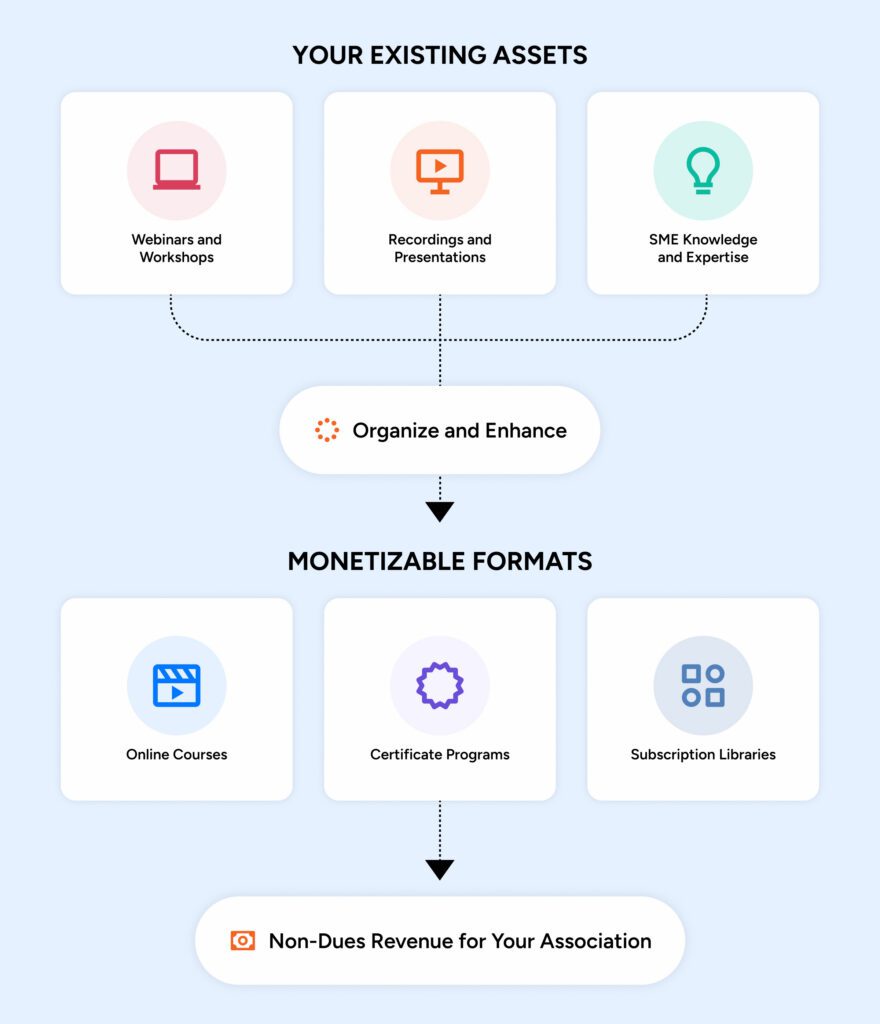
Your knowledge is often one of the strongest non-dues revenue opportunities an association has access to. Packaging your subject matter experts’ knowledge into online courses, certificate programs, continuing education, and premium learning libraries creates value while generating sustainable revenue.
Consider these common approaches:
- Selling individual courses
- Offering certification programs
- Charging for continuing education credits
- Creating subscription-based learning libraries
You don’t need dozens of courses to get started. Determine your high-demand topics, measure interest, and track engagement. An interactive course that offers practical solutions to real problems will deliver far more value than a large library that rarely gets used.
Choosing The Right LMS Content Creation Tool For Your Organization
The best content creation tools aren’t always the ones with the most features. The best tools address the issues your team actually faces.
As you evaluate authoring tools and LMS platforms, consider questions like:
- Can non-technical staff create and update content?
- Does it follow accessibility guidelines?
- Will this work for mobile learners?
- Will it integrate with your LMS and AMS?
- Can multiple team members collaborate on content?
- Is it easy to update courses as regulations or best practices change?
If your association has a small staff, simplicity matters. A tool that’s easy to learn and maintain will usually deliver more long-term value than one packed with advanced features your team doesn’t have time to use.
Looking for an affordable, functional, and enjoyable online learning software that helps you bring more value to your members? Classroom LMS has you covered. See for yourself and book your demo today!
FAQs
What Is LMS Content?
LMS content is any form of learning material that’s created, delivered, or managed through a learning management system. You may be thinking of online courses, but LMS content comes in several forms, including five-minute videos, downloadable resources, certification exams, interactive learning paths, and more.
What’s the Difference Between eLearning and an LMS?
All LMS learning is eLearning, but not all eLearning happens in an LMS. The LMS adds features like delivery, assignment, tracking, and reporting.
How Long Does It Take to Create an eLearning Course?
The Association for Talent Development found that it takes an average of 18 hours to develop a 6-minute microlearning video, and up to 67 hours for in-person, instructor-led training. These times vary depending on interactive elements and source materials.
How Much Does LMS Content Creation Cost / Is It Worth Building In-House?
The answer to that depends on your budget, staff capacity, and the type of education you’re providing. Many associations find that a combination of buying and building approaches works best.
Creating LMS content internally gives you complete control over both the content and the learner experience. The downside is that this can take up a lot of time. Even simple courses require planning, writing, reviews, and periodic updates.
Buying content allows small teams to expand their learning catalog quickly while focusing internal efforts on the subjects that make their organization unique.
For associations, the most sustainable strategy is a blend of both. Look at the educational content you already have and repackage it for online learning. With a little editing, your existing resources can become short learning modules, quizzes, or certificate programs—without requiring your small team to create everything from the ground up.
What Is SCORM And Why Does It Matter?
SCORM stands for Sharable Content Object Reference Model. These technical standards dictate how online learning materials and LMS communicate with each other, ensuring that a course created in one program can play and track data accurately on any SCORM-compliant platform. (Think: Authoring an app that works for both Android and iOS.)
Do I Need An Instructional Design Background To Create LMS Content?
No. Contemporary LMS and eLearning authoring tools are designed for subject matter experts and professionals to create and share educational materials without formal training. Simply use native authoring tools, leverage software and AI, and repurpose existing materials. Tip: It can be helpful to use frameworks like Bloom’s and ADDIE (Analyze, Design, Develop, Implement, and Evaluate).
How Do I Make LMS Content More Engaging?
Adding simple interactive elements, such as a short quiz or reflection prompt after each lesson, can keep learners engaged. Other engagement options include microlearning, real-world scenarios, multimedia elements, and gamification (badges/leaderboards).
Can Associations Sell LMS Content Or Earn Revenue From It?
Yes. Certification and credentialing programs can be offered on-demand on your website, through virtual training, or via in-person sessions. Just make sure the sessions you offer are worth the price you’re charging and include features that entice individuals to attend. This can be done by offering a unique educational course or by engaging a highly accredited speaker/educator.
In addition to certification courses, you can offer options like pre-recorded content, third-party courses, or webinars/panels from your events. Consider selling courses individually or bundling offerings together by subject or course level.
Many nonprofits host a wealth of fantastic educational content on their websites. Paywalling high-value resources such as guides, white papers, and case studies can be another revenue stream for your nonprofit. Consider charging a small fee for access to content like e-courses, educational webinars, e-books, and more!