Your onboarding materials live in a shared drive nobody can find. Your certification renewals get tracked in a spreadsheet someone updates “when they get a chance.” Your continuing education records exist across three systems that don’t talk to each other. If any of that sounds familiar, you already know why you’re reading a guide about choosing an LMS.
A learning management system touches a lot of moving parts: content, compliance, reporting, member or employee experience. That makes the decision harder to get right and more expensive to get wrong. This guide walks through a vendor-neutral framework for evaluating an LMS, whatever kind of organization you’re evaluating it for.
What Is an LMS and Who Needs One?
A learning management system (LMS) helps your organization create, deliver, and track educational content. At a basic level, it hosts courses, manages enrollment, and records completion. Some LMS platforms also handle certification and continuing education (CE) credit tracking, reporting on learner progress, and integration with the other systems your organization already runs on.
Who actually needs an LMS? More organizations than you’d think:
- Corporate L&D teams running employee onboarding, compliance training, or skills development
- Associations and certifying bodies managing continuing education requirements and professional certification programs
- Nonprofits training staff and volunteers across distributed or part-time teams
- Educational and membership organizations delivering courses as a revenue stream or a member benefit
What is the common thread between these organizations that choose to leverage an LMS? Organizations switch to an LMS to replace manual tracking, spreadsheets, and to empower staff time. Also, with more learning content, organizations need to level up compliance requirements and certification tracking, often requiring a switch to a dedicated LMS.
How to Choose an LMS: A Step-by-Step Framework
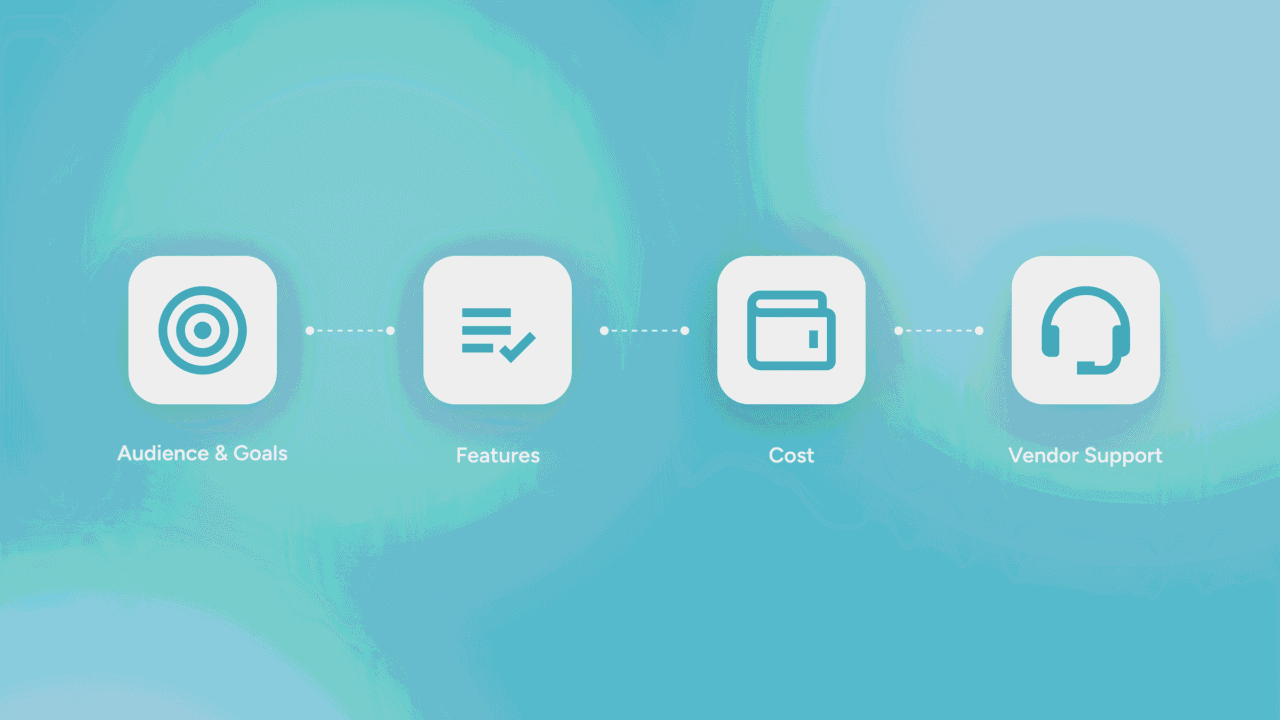
Most LMS buyer’s guides are written by a single vendor, which means the framework conveniently ends at their own feature list. Here’s a vendor-neutral version, built around four questions in order:
- Who are you training, and to what outcome?
Your learning audience and organizational goals will shape every requirement that follows.
- What features does that audience actually require?
Not every organization needs the same feature set, and paying for capability you won’t use is its own kind of cost.
- What will this actually cost, all in?
Oftentimes, the licensing fee is the visible number you see initially quoted. It is important to also consider the costs of implementation, migration, and admin time, so you budget appropriately.
- Can the vendor support you as you grow?
Look for a vendor who can scale with you, offering support quality and integration depth. These factors matter more once you’re two years into the relationship than they do on demo day.
The rest of this guide walks through each of these crucial stage stages.
Define Your Audience and Learning Goals
Before you look at a single feature list, get specific about who’s learning at your organization and why. For example, the learning requirements for a 40-member nonprofit that is onboarding new hires will look different from the requirements for a healthcare association tracking CE credit across 12,000 certified members.
Try writing down your top three learning goals before you begin any vendor conversations for LMS platforms.
Here are some top learning goals:
- Employee onboarding
If your organization is looking to onboard employees, you’ll need something learners can complete quickly, with clear completion tracking for HR and managers. Keep in mind that the depth of content authoring matters less than the ease of assignments and reporting.
- Certification and continuing education programs
For certification programs, audit trails matter enormously to maintain compliance. You need automated CE credit capture, renewal reminders, and reporting that satisfies whatever accrediting body your organization answers to.
- Continuing education as a member benefit or revenue line
Consider offering a smoother learner experience or a bundling e-commerce experience if your members pay for courses or expect them part of their dues.
Must-Have LMS Features to Evaluate
Once you know your learner audience, evaluate potential LMS features against your specific use case rather than a generic checklist. All that said, a few capabilities show up as requirements often enough to call out directly:
- Course authoring and content management — can your team build and update courses without submitting a ticket to the vendor?
- SCORM and xAPI support — required if you’re bringing in content built elsewhere, or if you work with third-party course libraries.
- Certification and CE tracking — automated credit capture, renewal alerts, and audit-ready reporting, if your organization issues or tracks certifications.
- Reporting and analytics — completion rates, cohort progress, and exportable reports your board or accrediting body will ask for.
- Mobile access — a real requirement if your learners are field staff, volunteers, or members who aren’t at a desk all day.
- Integrations — particularly with your association management software (AMS) or CRM, so learner records don’t live in a separate silo from member records.
- Compliance and audit trail tools — timestamped completions and credit history that hold up if you’re ever audited.
Consider these features against your learner audience and goals, because a feature that’s essential for a certifying body may be irrelevant for a company running basic onboarding, and a platform that’s strong on employee training may be thin on CE credit management.
Budget and Total Cost of Ownership
As mentioned earlier, the quoted license fee is the beginning of the conversation, not the end of it. To properly budget for your LMS and make the case to your board, you’ll need to understand the total cost of ownership for adopting new software. A full total cost of ownership (TCO) picture includes the following:
- Licensing model — per-learner, per-admin, or flat platform fee, and how that scales as your learner count grows
- Implementation costs — setup, configuration, and any professional services fees for a more complex rollout
- Content migration — moving existing courses, certificates, and historical records into the new system
- Training and change management — time your team spends learning the new admin experience
- Ongoing admin time — how much staff time the platform requires to run month to month, which is a real cost even when no invoice shows up for it
Ask every vendor for a TCO estimate over three years, not just a first-year quote. A platform with a lower sticker price and a heavier implementation lift can cost more overall than one priced higher up front. Specific numbers here matter more than a vendor’s general reassurance that their platform is “affordable.”
Vendor Support, Scalability, and Integrations
After you sign the contract is the stage that matters most. It’s also when many vendor relationships can get rocky. To ensure you find a vendor that scales to meet your needs and functions as a technology partner, look for these best practices:
Support responsiveness
Ask what support looks like after go-live, not just during the sales process. What’s the response time on a ticket? Is there a dedicated contact, or a general queue? What happens when your admin has a question three months in, once the onboarding team has moved on to the next client?
Scalability
Will the platform hold up if your learner count doubles, or if you add a new certification track next year? Ask for a specific example of a client who scaled with the platform, not a general claim that it “scales well.”
Integrations
If you’re an association, prioritize integration with your AMS. You don’t want your member records and learning records living in separate systems that require manual reconciliation. Ask specifically which systems the LMS integrates with natively versus which require custom development.
Seek out reference calls with existing clients, since it’s unlikely these situations will come up in a demo. If possible, make at least two reference calls.
LMS Evaluation Checklist
Ready to put everything you learned in this guide to work? Use the following checklist to guide you across your vendor conversations. Ultimately, you can turn this checklist into a formal RFP:
- [ ] Documented your top three learning goals and audience types
- [ ] Confirmed certification and CE tracking requirements, if applicable
- [ ] Verified SCORM/xAPI compatibility for any existing content
- [ ] Checked mobile access for field staff, volunteers, or remote learners
- [ ] Confirmed AMS or CRM integration, native versus custom
- [ ] Requested a three-year TCO estimate, not just year-one pricing
- [ ] Asked about post-implementation support structure and response times
- [ ] Spoken with at least two reference clients at a similar scale
- [ ] Confirmed reporting output matches what your board or accrediting body requires
FAQ
What should I look for in an LMS?
Start with your audience and learning goals, then evaluate features against that specific need. Look for an LMS that offers course authoring, certification and CE tracking, reporting, mobile access, and integration with your existing AMS or CRM. However, if you skip straight to the features, you’ll end up evaluating capability you don’t need.
How much does an LMS typically cost? Pricing models vary by per-learner, per-admin, or flat platform fee, and the quoted license cost is only part of the total cost of ownership. Implementation, content migration, and ongoing admin time all add to the end cost. Be sure to ask any vendor for a three-year estimate rather than a first-year number.
What’s the difference between an LMS for employees and an LMS for members or customers?
An employee-facing LMS typically prioritizes fast onboarding, compliance tracking, and manager visibility into completion. A member- or customer-facing LMS puts more weight on learner experience, certification and CE credit tracking, and sometimes e-commerce capability if courses are sold or bundled with membership.
How long does LMS implementation take?
Timelines depend on content volume, the number of integrations required, and how much historical data needs to migrate. A straightforward rollout with limited content can take a few weeks; a full migration with certification history and multiple system integrations can take a few months. Ask prospective vendors for a timeline based on your specific scope, not an average rollout.
Do I need SCORM support in my LMS?
If you’re bringing in courses built outside the platform, whether from a third-party library or a previous system, SCORM (or xAPI) compatibility is what lets that content load and track correctly. If all your content is built natively inside the new platform, it matters less, but it’s worth confirming either way before you sign.