Gathering the Essentials: How to Prepare for a New AMS
A well-prepared association ensures a smooth transition to a new Association Management Software (AMS).
Thorough preparation minimizes potential disruptions and maximizes the benefits of your investment. Proper planning is crucial to overcome challenges such as data migration, process redesign and staff readiness.
Why Preparation Makes or Breaks Your AMS Implementation
Preparation is the cornerstone of AMS implementation success. Switching to a new AMS is a major milestone for your association—but without the right preparation, it can quickly turn into a stressful, disorganized process. Proper planning helps you avoid data migration issues, workflow bottlenecks and low staff adoption rates. By laying the groundwork early, you set your association up for a seamless transition and long-term success.
A Solid Preparation Plan Addresses Risk By
Ensuring accurate and clean data is migrated.
Streamlining forms and workflows for efficiency.
Standardizing internal processes across departments.
Minimizing disruptions to daily operations during the transition.
Reducing the risk of member data loss or inaccuracies.
Ensuring staff are properly trained and ready to use the new system.
Identifying and resolving integration challenges before go-live.
Establishing clear communication to manage stakeholder expectations.
Creating a structured timeline to prevent delays and last-minute issues
Get Your Data in Order: The First Step to a Smooth AMS Transition
Before you migrate to a new AMS, your data needs to be clean, organized and structured for success. Messy or outdated data can cause major issues, from inaccurate member records to failed migrations. By assessing what you have, removing redundancies and standardizing formats, you’ll ensure a seamless transition and make the most of your new system from day one.
Clean Up Your Data: The Key to a Smooth AMS Migration
Preparing your data ensures a seamless migration into the new AMS. Start by cleaning and standardizing your existing data to remove redundancies and errors.
Focus on:
- Duplicate Removal: Eliminate duplicate records to maintain accuracy.
- Standardized Formats: Ensure data is formatted uniformly (e.g., consistent date formats).
- Error Correction: Identify and fix inaccuracies, such as outdated contact information.
- Consistent Naming Conventions: Standardize member names, organizations and titles to avoid mismatches.
- Data Completeness: Fill in missing fields like phone numbers, email addresses and membership statuses.
- Obsolete Data Removal: Archive or delete outdated records that are no longer relevant.
- Field Mapping Alignment: Ensure data fields in your current system match those in the new AMS for a seamless transition.
- Duplicate Prevention Measures: Implement ongoing protocols to prevent duplicate entries in the future.
Tackle Dirty Data Once and For All
Get in-depth solutions for duplicate removal, data standardization and error correction in our Dirty Data Guide. It’s packed with actionable steps to help you clean and maintain reliable member information—so your new AMS migration goes off without a hitch.

What Stays and What Goes: Identifying the Right Data to Migrate
Not all data needs to make the move to your new AMS. Migrating unnecessary or outdated records can slow down the transition and clutter your system from day one. By carefully evaluating what’s essential—like member records, event history and financial transactions—you’ll create a streamlined, efficient database that sets your association up for long-term success.
Assess what data is essential:
- Member records, including contact details and membership statuses.
- Event history and attendance records.
- Financial transactions, including dues and donations.
- Communication logs, such as email histories or surveys.
- Volunteer participation records to track member contributions.
- Committee and board involvement history for leadership tracking.
- Certification and continuing education records for professional development.
- Preferences and engagement metrics to personalize member experiences.
- Old system audit logs to track past changes and maintain data integrity.
Protecting Member Data: Privacy and Compliance Best Practices
Handling member data comes with serious responsibilities. Compliance with regulations like GDPR and CCPA isn’t just a legal requirement—it’s essential for maintaining trust and security. Before migrating to a new AMS, ensure your data handling processes align with privacy laws, safeguard sensitive information and meet industry standards.
Taking these steps now will help you avoid compliance risks and keep your members’ data secure. Collaborate with legal and IT teams to ensure that all processes adhere to data protection laws.
Optimizing Forms and Workflows for a More Efficient AMS
Your AMS is only as effective as the processes it supports. Outdated forms and inefficient workflows can slow down operations, frustrate members and create unnecessary work for staff. Before migrating to a new system, take the time to evaluate existing forms, streamline workflows and identify opportunities for automation. A well-structured AMS not only improves efficiency but also enhances the member experience.
Identifying and Improving Existing Forms
Your association relies on forms for everything from member sign-ups to event registrations, but outdated or inefficient forms can create bottlenecks and frustrate users. Before transitioning to a new AMS, review your existing forms to eliminate redundancies, improve user experience and ensure they align with your new system’s capabilities. Streamlining forms now will help prevent data entry errors, enhance engagement and make workflows more efficient.
Focus on:
- Membership applications and renewal forms.
- Event registration and feedback forms.
- Surveys and donation forms.
- Sponsorship and exhibitor applications for events.
- Volunteer interest and participation forms.
- Committee and leadership nomination forms.
- Custom member profile update forms to keep records current.
- Request forms for certifications, credentials or continuing education.
- Data collection forms for member preferences and engagement tracking.
Streamlining Workflows to Enhance Efficiency and Automation
Workflows determine how efficiently tasks are completed within your association. If they’re slow, manual or inconsistent, they can lead to delays, errors and frustration. By mapping out key workflows before AMS implementation, you can identify inefficiencies, remove unnecessary steps and integrate automation where possible. A well-structured workflow ensures smoother operations, better member engagement and reduced administrative burden.
Examples include:
- Member onboarding processes.
- Event planning workflows.
- Communication cycles for newsletters and updates.
- Member renewal and retention outreach campaigns.
- Volunteer and committee management workflows.
- Dues and billing cycle processes for financial consistency.
- Application review and approval workflows for grants or scholarships.
- Member feedback collection and response processes.
- Content creation and approval workflows for website and email updates.
Leveraging Automation to Digitize and Streamline Processes
Manual processes slow down productivity and leave room for errors, but a modern AMS can help digitize and automate routine tasks. By identifying areas where automation can reduce workload, you can free up staff time for more strategic initiatives. From automatic member renewals to real-time reporting, digitizing processes ensures a more seamless experience for both staff and members.
Automate tasks like:
- Membership renewals and payment reminders.
- Event registrations and attendee tracking.
- Reporting and analytics generation.
- Automated email responses for inquiries and support tickets.
- Self-service member portal updates and profile management.
- Integration with accounting software for real-time financial tracking.
- Automated survey distribution and feedback collection.
- Scheduled social media posts and content distribution.
- System-generated alerts for expiring certifications or compliance requirements.
Connecting Your AMS and Website for a Better Member Experience
Your website is the central hub for member engagement, and integrating it seamlessly with your new AMS ensures a smooth, user-friendly experience. From member portals to event calendars, a well-connected AMS enhances functionality and eliminates manual data entry.
Before implementation, assess your website’s needs, identify key integration points and collaborate with your IT team to ensure real-time data syncing. A strong integration strategy will improve efficiency, boost engagement and streamline operations.
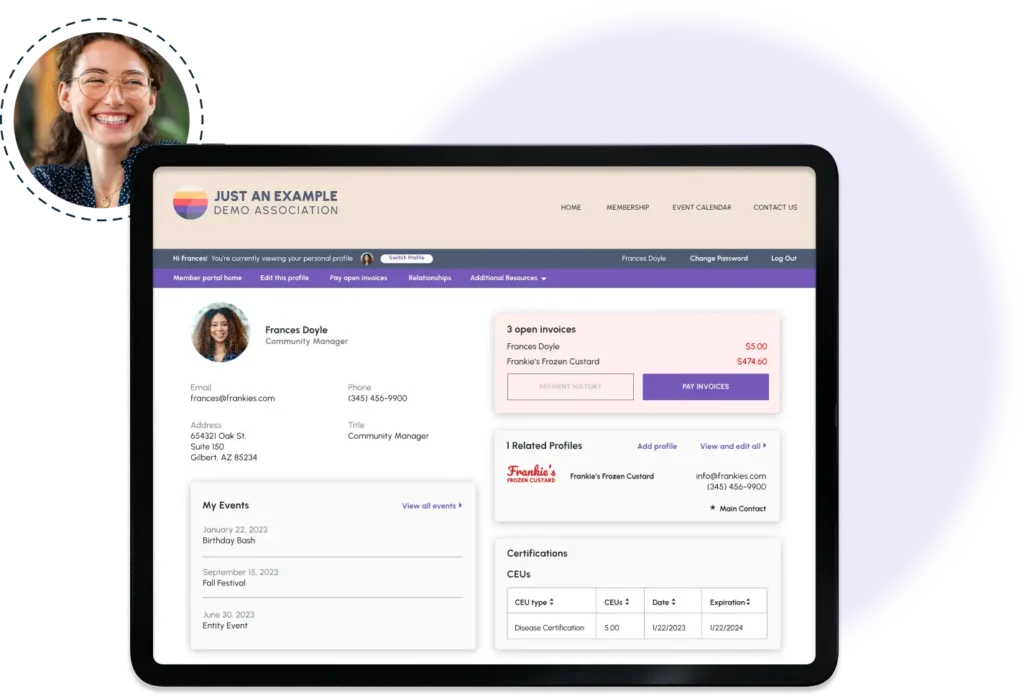
Evaluating Your Website for Seamless AMS Integration
Your website is one of the most important touchpoints for members, so it needs to work seamlessly with your AMS. A disconnected or outdated website can create frustration, prevent engagement and lead to inefficiencies. Before implementing a new AMS, conduct a thorough audit to identify gaps, optimize functionality and ensure smooth integration. A well-structured website enhances the member experience and maximizes the benefits of your AMS.
Look for integration opportunities like:
- Member portals for account management.
- Event calendars and online directories.
- Single sign-on (SSO) capabilities for seamless access.
- Mobile-friendly design for easy access on any device.
- Automated membership renewal and payment processing.
- Self-service options for updating profiles and preferences.
- Personalized dashboards displaying relevant member content.
- E-commerce or donation pages integrated with AMS billing.
- Accessibility compliance to ensure all members can engage.
Building a Strategic Plan for AMS Website Integration
Integrating your AMS with your website requires careful planning to ensure data flows seamlessly between systems. Without a strategic approach, you may run into sync errors, broken functionality or security vulnerabilities.
Collaborate with your IT and web development teams early to identify integration needs, test performance and prevent disruptions. A solid integration plan will enhance efficiency, improve user experience and provide long-term stability.
Key considerations include:
- Identifying necessary plugins or APIs.
- Ensuring real-time syncing of member data between the AMS and your website.
- Testing the integration thoroughly before launch.
- Confirming security protocols to protect sensitive member data.
- Setting up automated data backups to prevent data loss.
- Ensuring compatibility with existing third-party tools and platforms.
- Creating contingency plans in case of integration failures.
- Optimizing page load speeds to handle AMS-related data exchanges.
- Designing a user-friendly navigation structure to highlight AMS features
Strengthening Your Operations: Updating Internal Processes and Procedures
A new AMS isn’t just about upgrading software—it’s an opportunity to improve how your association operates. Outdated processes can slow down efficiency, create inconsistencies and make it harder for staff to serve members effectively. Before launching your new AMS, take the time to review and update internal procedures, ensuring they align with the system’s capabilities. Standardized, well-documented processes will lead to a smoother transition, better data integrity and long-term operational success.

Creating Consistency: Standardizing Processes Across Departments
An AMS works best when every department follows standardized processes. Without consistency, data discrepancies, communication gaps and reporting errors can slow down efficiency and lead to frustration. Establishing uniform procedures ensures smooth collaboration, reduces errors and helps staff get the most out of the AMS. By aligning processes across teams, your association can improve operational efficiency and provide a seamless member experience.
Standardize practices like:
- Data entry protocols to minimize errors.
- Communication workflows for uniform messaging.
- Financial reporting practices for transparency.
- Standardized approval processes for memberships, events and finances.
- Consistent tagging and categorization of member records for easy segmentation.
- Uniform scheduling and follow-up procedures for renewals and payments.
- Cross-departmental collaboration guidelines for handling member inquiries.
- Centralized documentation for process guidelines and best practices.
- Defined escalation procedures for troubleshooting AMS-related issues.
Establishing Clear Guidelines for AMS Usage
A new AMS is only as effective as the people using it. Without clear guidelines, staff may enter data inconsistently, struggle to generate reports or underutilize key features. Defining standardized procedures ensures accurate data, effective reporting and smooth day-to-day operations. Establishing these best practices from the start will help your team maximize the AMS’s potential and avoid inefficiencies.
Create guidelines and best practices for AMS use, including:
- Data input standards for consistency.
- Reporting protocols for accurate analytics.
- Training schedules for onboarding new staff.
- Guidelines for managing user permissions and access levels.
- Procedures for merging or updating duplicate member records.
- Best practices for scheduling automated tasks and workflows.
- Policies for exporting, sharing and storing AMS-generated data.
- Regular review cycles to update and refine AMS procedures as needed.
- Troubleshooting guides for common system errors or user issues.
Preparing Your Team for the Transition
Training Your Team for AMS Success
A well-trained team is essential for a smooth AMS transition. If staff are unsure how to use key features, adoption rates may drop, leading to inefficiencies and frustration. Providing hands-on training, easy-to-access resources and ongoing support ensures your team is confident and capable in using the system. Investing in proper training will drive adoption and maximize the value of your AMS.
Equip your team with the knowledge to use the AMS effectively by:
- Scheduling hands-on training sessions tailored to roles.
- Providing user guides and video tutorials.
- Offering ongoing support during and after implementation.
- Hosting live Q&A sessions to address common user concerns.
- Setting up an internal AMS help desk or knowledge base.
- Creating training checkpoints to assess staff progress and understanding.
- Encouraging power users to act as AMS champions and support peers.
- Developing role-based training plans to ensure each department is equipped.
- Offering refresher courses as updates and new features roll out.

Managing Change: Ensuring a Smooth AMS Transition
Change isn’t always easy, especially when implementing a new AMS that impacts daily workflows. Staff may resist the transition if they don’t understand the benefits or feel overwhelmed by new processes. A structured change management plan helps ease concerns, foster engagement and ensure a smoother adoption. By clearly communicating the benefits, encouraging feedback and celebrating progress, you can create a positive transition experience.
Foster a positive transition by:
- Communicating the benefits of the AMS clearly to staff.
- Encouraging feedback and addressing concerns promptly.
- Celebrating milestones, such as completing data migration or system go-live.
- Identifying AMS champions within departments to support adoption.
- Providing regular updates on implementation progress and next steps.
- Offering incentives or recognition for staff engagement in the transition.
- Holding interactive demonstrations to showcase AMS capabilities.
- Developing a phased implementation approach to ease staff into the new system.
- Gathering post-launch feedback to refine training and support efforts.
A Good AMS Offers Support Beyond Implementation
When evaluating AMS options, remember that the best vendors don’t just sell you software; they stay with you after the purchase. With MemberClicks’ Professional Services Packages, you’ll receive hands-on assistance—from fine-tuning your data migration to optimizing workflows—ensuring your new AMS delivers long-term success well after go-live.

Ensuring a Smooth Launch: Creating a Go-Live Checklist
The final stretch before launching your new AMS is critical. A well-structured go-live checklist ensures nothing is overlooked, from data validation to system testing and stakeholder communication. Without proper planning, unexpected issues can arise, disrupting operations and frustrating members. By carefully reviewing every step before launch, your association can transition smoothly, minimize risks and confidently move forward with your new AMS.
Final Data Review: Ensuring Accuracy Before Migration
Conduct a thorough review of all data to ensure accuracy and readiness for migration. Missing, outdated or inconsistent data can cause errors, create confusion and disrupt workflows in the new system. Taking the time to validate and clean up data now will help ensure a seamless transition and prevent complications down the line.
- Verify that all member records are accurate and up to date.
- Ensure financial data, including dues and payment records, is complete.
- Confirm all event history and attendance records are correctly categorized.
- Check communication logs, including email and survey data, for completeness.
- Identify and resolve duplicate, obsolete or inconsistent records.
- Ensure all required fields are properly mapped for migration.
- Run a final test import to catch potential formatting errors.
- Verify compliance with data privacy regulations before migration.
- Create a backup of all legacy data for reference and security.
System Testing: Ensuring a Flawless AMS Launch
Before going live, your AMS must be rigorously tested to ensure everything functions as expected. System testing helps uncover potential issues, from integration failures to user experience problems. Engaging key staff in testing allows you to resolve any issues before launch, ensuring a smoother transition and a better experience for both staff and members.
Engage key staff in testing to identify and resolve issues:
- User acceptance testing (UAT) to validate functionality.
- Testing integrations with existing systems, such as websites or accounting software.
- Verifying that all automated workflows function as intended.
- Checking that member logins and self-service portals work correctly.
- Running test transactions for payments, renewals and event registrations.
- Ensuring reports and analytics generate accurate data.
- Simulating different user roles to test permissions and access levels.
- Assessing mobile responsiveness and usability across devices.
- Reviewing error logs and system alerts for any unresolved issues.
Communicating the Go-Live Plan: Keeping Stakeholders Informed
A successful AMS launch depends on clear, proactive communication with stakeholders. Staff, members and leadership should all know what to expect, how to access support and where to find resources. By outlining a clear go-live plan, your association can reduce confusion, build confidence in the transition and ensure a smoother adoption process.
Inform stakeholders about the go-live plan with clear communication:
- Announce timelines and expectations through newsletters or meetings.
- Provide support resources, such as a dedicated help desk or FAQ page.
- Send targeted emails to different user groups with relevant instructions.
- Host a pre-launch webinar or training session to walk users through key features.
- Create quick-start guides or tutorial videos for staff and members.
- Set up an internal communication channel for real-time questions and support.
- Outline contingency plans for handling potential launch-day issues.
- Schedule follow-up check-ins to gather feedback and address concerns.
- Publicly acknowledge and celebrate the go-live milestone.
Conclusion and Next Steps
Recap of Key Preparation Steps
Preparing for an AMS involves data cleanup, workflow redesign, website integration, process updates and staff training. By addressing these areas, associations can ensure a seamless transition.
Moving Forward
Schedule a kickoff meeting with your AMS vendor to review the preparation plan and align on next steps. Transitioning to a new AMS is a collaborative effort that sets the stage for long-term success.

Discover the difference a true software partner can make
Book a call with our team today and discover how MemberClicks can help you achieve your goals and build meaningful relationships with your members.
Schedule a call







 Need Help?