AMS Best Practices – Maximizing MemberClicks for Your Association
Using an AMS like MemberClicks can effectively transform the way your association operates. Adopting best practices helps you unlock the software’s full potential, ensuring smooth operations, happier members and better outcomes.
Unlocking the Full Potential of Your AMS: Why Best Practices Matter
It’s simple. A well-utilized AMS saves time, improves efficiency and strengthens member satisfaction. When your tools work seamlessly, your team can focus on achieving your organization’s goals without unnecessary distractions.
Setting the Foundation
A strong foundation is essential for success. Start by reviewing your AMS settings, workflows and configurations regularly. This helps align the system with your association’s changing needs. Staying proactive ensures your processes remain relevant and effective, providing a solid base for all MemberClicks features.

1. Streamlining Membership Management: Boost Retention and Engagement
Managing memberships efficiently is key to keeping your association thriving. With MemberClicks, you can automate renewals, improve member outreach and simplify administrative tasks—freeing up valuable time for your team.
Here’s how you can maximize your membership management:
Automate and Optimize Renewals
Renewals don’t have to be a manual process. MemberClicks makes it easy to:
- Track Upcoming Renewals: Use custom filters and reports to identify members approaching their renewal dates.
- Set Up Automated Reminders: Create a multi-step email sequence to ensure timely renewals:
- 30 Days Before Expiration: A friendly reminder highlighting renewal benefits and a direct link to renew.
- 7 Days Before Expiration: A follow-up with urgency, offering assistance if needed.
- Post-Expiration Follow-Up: A thank-you message for those who renewed, and a re-engagement email for lapsed members.
- Enable Auto-Renewal Options: Give members the option to set up automatic renewals, reducing the risk of lapses.
Personalize Member Outreach
A one-size-fits-all approach doesn’t work. MemberClicks’ segmentation tools allow you to:
- Group Members Based on Key Criteria: Sort members by engagement level, location, industry, membership type or renewal history to send targeted communications.
- Customize Renewal Messaging: Adjust emails based on a member’s history, highlighting relevant benefits or offering incentives for early renewal.
- Use SMS or In-App Notifications: Not everyone checks emails regularly—send text message reminders or in-app notifications to encourage renewals.
Enhance Member Self-Service Options
Empower members to manage their own accounts by:
- Enabling Self-Service Profile Updates: Let members update their contact details, membership status and payment information through their online portal.
- Offering Multiple Payment Methods: Support credit card, ACH and even installment plans to make renewals more convenient.
- Providing a Renewal Progress Tracker: Show members how close they are to completing their renewal process, reducing drop-off rates.
Automate Membership Onboarding and Engagement
First impressions matter! Set up automated workflows to engage both new and renewing members:
- Welcome Email Sequences: Send a personalized welcome series introducing new members to key benefits and resources.
- New Member Orientations: Automate event invites for virtual orientations, Q&A sessions or networking meetups.
- Engagement Checkpoints: Schedule automated check-ins at 3, 6 and 9 months to keep members engaged throughout their journey.
By leveraging MemberClicks’ automation, segmentation and self-service tools, you can create a seamless, stress-free membership management process—resulting in higher retention rates and a more engaged community.
2. Effortless Event Management: Plan, Promote and Optimize with MemberClicks
Hosting successful events requires seamless coordination, but MemberClicks takes the complexity out of event management. From registration to engagement tracking, here’s how your association can make the most of its event planning tools:
Streamline Event Registration
Make it easy for members to sign up with customizable registration options:
- Create Branded Event Pages: Design user-friendly pages with your association’s branding, clear event details and an intuitive sign-up process.
- Offer Flexible Ticketing Options: Set up different ticket types, including member-exclusive pricing, VIP access, group discounts and early bird specials.
- Automate Payment Processing: Allow attendees to pay via credit card, ACH or invoice, reducing administrative work.
- Enable One-Click Registration for Members: Pre-fill member details to make sign-ups effortless.
Personalize the Event Experience
Boost engagement by tailoring the event journey for your members:
- Automate Personalized Invitations: Send targeted invites based on past attendance, interests or member type.
- Provide Exclusive Perks: Offer member-only sessions, networking lounges or VIP upgrades to drive event participation.
- Schedule Automated Reminders: Keep attendees informed with pre-event countdown emails, last-minute reminders and schedule updates.
Optimize Event Engagement and Participation
Go beyond registration—use MemberClicks to enhance attendee experiences:
- Enable Interactive Event Features: Use discussion forums or event-based communities within MemberClicks to facilitate networking before and after the event.
- Track Attendee Check-Ins: Monitor attendance in real-time and track engagement levels throughout the event.
- Collect Feedback Automatically: Send post-event surveys to gather insights, measure success and improve future events.
Gain Actionable Insights with Event Analytics
Make data-driven decisions with MemberClicks’ reporting tools:
- Analyze Registration Trends: Identify which types of events, ticketing options and promotions drive the most attendance.
- Monitor Engagement Metrics: Track session attendance, survey responses and networking participation to understand what resonates with members.
- Measure Financial Performance: View revenue from ticket sales, sponsorships and donations to optimize budgeting for future events.
3. Simplified Financial Management: Automate, Track and Optimize with MemberClicks
Keeping your association’s finances in order doesn’t have to be overwhelming. MemberClicks helps streamline dues collection, payment tracking and financial reporting—saving your team time and improving cash flow. Here’s how you can maximize its financial management features:
Automate Dues Collection and Payment Processing
Reduce manual work and ensure steady revenue with automation:
- Set Up Recurring Dues Payments: Give members the option to enroll in auto-renewals to prevent lapses.
- Offer Multiple Payment Methods: Accept credit cards, ACH transfers and invoice payments for greater flexibility.
- Customize Payment Plans: Provide installment options for members who prefer to pay in smaller amounts.
- Automate Payment Confirmations: Ensure members receive instant receipts for all transactions, reducing follow-up requests.
Optimize Event Engagement and Participation
Go beyond registration—use MemberClicks to enhance attendee experiences:
- Enable Interactive Event Features: Use discussion forums or event-based communities within MemberClicks to facilitate networking before and after the event.
- Track Attendee Check-Ins: Monitor attendance in real-time and track engagement levels throughout the event.
- Collect Feedback Automatically: Send post-event surveys to gather insights, measure success and improve future events.
Simplify Financial Reconciliation
Keep financial records accurate and up to date with built-in reconciliation tools:
Sync Transactions in Real Time: Track incoming payments and match them against member records.
Generate Automated Reports: Easily pull transaction summaries, revenue breakdowns and overdue balances to assess financial health.
Integrate with Accounting Software: Connect MemberClicks with platforms like QuickBooks to reduce manual data entry and errors.

Gain Financial Insights with Custom Reporting
Understand your association’s financial performance at a glance:
Monitor Key Revenue Streams: Track income from dues, event registrations, sponsorships and fundraising efforts.
Identify Payment Trends: Analyze when members are most likely to renew or which payment methods are most popular.
Improve Budgeting and Forecasting: Use historical data to make informed financial decisions for the future.
With MemberClicks’ financial management tools, your association can reduce administrative burdens, increase revenue predictability and improve transparency, ensuring financial stability for long-term success.
4. Elevate Communication and Engagement: Strengthen Member Connections with MemberClicks
Effective communication is the foundation of strong member engagement. MemberClicks provides the tools you need to create targeted, timely and meaningful interactions that keep members connected and involved.
Here’s how to maximize your communication strategy:
Automate and Personalize Email Campaigns
Keep members informed and engaged with customized messaging:
- Create Dynamic Email Campaigns: Design and schedule newsletters, event promotions and member spotlights tailored to different segments.
- Segment Your Audience for Better Outreach: Target messages based on membership type, engagement level, past event attendance or renewal status.
Automate Key Communications:
- Welcome Series for New Members: Introduce benefits and resources with a step-by-step onboarding email sequence.
- Event Reminders and Follow-Ups: Send automated RSVP confirmations, countdown reminders and post-event thank-yous.
- Re-engagement Campaigns: Reach out to inactive members with exclusive offers or personalized messages to bring them back into the fold.
Track Performance and Optimize Your Approach
Improve messaging effectiveness with data-driven insights:
- Monitor Email Metrics: Analyze open rates, click-through rates and conversion rates to refine your strategy.
- A/B Test Subject Lines and Content: Experiment with different approaches to see what resonates best with your audience.
- Use Engagement Scores: Identify highly engaged members versus those who may need more personalized outreach.
Enhance Member Profiles for Better Communication
Encourage members to update their profiles regularly, ensuring you have accurate, up-to-date information for more relevant communication:
- Allow Self-Editing of Profiles: Let members update their contact details, preferences and interests.
- Collect Engagement Preferences: Give members options to choose their communication frequency and topics of interest.
- Leverage Profile Data for Personalization: Use updated member info to send targeted messages—whether it’s recognizing an anniversary, offering relevant event recommendations or tailoring renewal reminders.
Track Performance and Optimize Your Approach
Improve messaging effectiveness with data-driven insights:
- Monitor Email Metrics: Analyze open rates, click-through rates and conversion rates to refine your strategy.
- A/B Test Subject Lines and Content: Experiment with different approaches to see what resonates best with your audience.
- Use Engagement Scores: Identify highly engaged members versus those who may need more personalized outreach.
By leveraging MemberClicks’ communication and engagement features, your association can strengthen member relationships, increase participation and build a vibrant, connected community.
5. Unlock Actionable Insights: Leverage MemberClicks for Smarter Decision-Making
To grow and improve, your association needs clear, data-driven insights. MemberClicks makes it easy to track key performance metrics, helping you measure success, optimize engagement and refine your strategy. Here’s how to make the most of its analytics and reporting tools:
Track Membership Growth and Retention
Understanding membership trends helps you maintain and expand your community:
- Monitor Retention Rates: Identify renewal patterns and pinpoint when and why members lapse.
- Analyze New Member Acquisition: Track sign-ups by source to see which marketing channels drive the most growth.
- Segment Membership Data: Break down stats by member type, location, industry or engagement level to refine outreach.

Measure Engagement to Improve Participation
Get a clear picture of how members interact with your association:
- Track Event Attendance Trends: Analyze which events attract the most participants and what factors influence engagement.
- Monitor Email Performance: Assess open rates, click-through rates and response patterns to fine-tune communications.
- Evaluate Community Engagement: Measure activity in forums, member directories and online discussions to understand what drives interaction.
Assess Financial Performance in Real Time
Stay on top of your association’s financial health with detailed reporting:
- Monitor Dues and Payment Trends: Track membership revenue, outstanding balances and auto-renewal adoption rates.
- Analyze Event Revenue: Compare ticket sales, sponsorship income and expenses to optimize budgeting.
- Track Donations and Fundraising Efforts: Understand donor behaviors and campaign effectiveness.
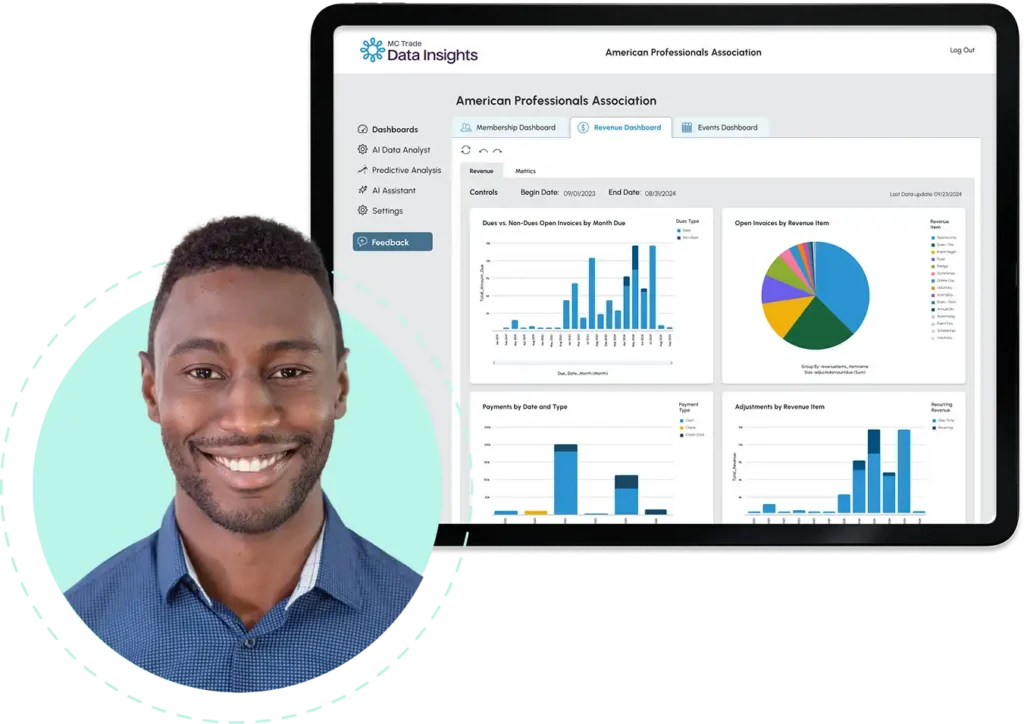
Use Customizable Dashboards for Quick Insights
Make data-driven decisions with real-time analytics dashboards:
- Visualize Key Metrics at a Glance: Create custom dashboards for your leadership team, showing the most relevant data.
- Automate Scheduled Reports: Set up weekly, monthly or quarterly reports to keep stakeholders informed.
- Export and Share Data Easily: Generate CSV, Excel or PDF reports to streamline internal analysis and board presentations.
6. Build Thriving Member Engagement with MemberClicks
Creating a strong sense of community is essential for keeping members engaged and invested in your association. MemberClicks provides powerful tools to foster networking, collaboration and knowledge sharing, ensuring members feel connected and valued. Here’s how you can enhance community engagement:
Foster Member Interaction with Community Forums
Encourage meaningful conversations and networking by setting up dedicated discussion spaces:
- Launch Discussion Boards: Create topic-based forums where members can share insights, ask questions and engage in peer-to-peer learning.
- Promote Participation: Encourage members to contribute by hosting weekly discussion prompts, Q&A sessions or expert-led conversations.
- Enable Moderation Tools: Maintain a respectful, engaging environment by assigning moderators to guide discussions and resolve conflicts.
- Integrate with Member Profiles: Allow members to highlight their expertise and interests in discussions, making it easier to connect with like-minded peers.
Provide Easy Access to Online Resources
Support continuous learning and engagement by offering valuable digital content:
- Build a Knowledge Hub: Create a centralized digital library with guides, whitepapers, past event recordings and industry reports.
- Organize Resources for Easy Navigation: Categorize materials by topic, membership level or event to help members find relevant information quickly.
- Encourage User-Generated Content: Allow members to contribute resources, case studies or best practices to enrich the knowledge base.
- Track Content Engagement: Monitor which resources are most viewed and downloaded to tailor future content offerings.
Strengthen Networking with Member Directories and Groups
Facilitate connections and collaboration with structured networking tools:
- Launch a Member Directory: Enable searchable profiles so members can find and connect with peers based on location, industry or expertise.
- Create Special Interest Groups: Form sub-communities around shared interests, professions or committee work to encourage deeper engagement.
- Host Virtual Meetups: Use MemberClicks’ event management tools to organize online networking sessions and group discussions.
By leveraging MemberClicks’ community-building features, your association can enhance member satisfaction, increase retention and create a more engaged and collaborative membership experience.
7. Seamless Integrations: Enhance Efficiency and Automate Workflows with MemberClicks
Integrating MemberClicks with your existing tools helps streamline operations, reduce manual work and improve data accuracy. By connecting your AMS with other platforms, you can automate processes, enhance communication and create a more efficient workflow. Here’s how:
Automate Communication with Email Marketing Integrations
Keep members informed and engaged by syncing MemberClicks with your email marketing tools:
- Connect with Platforms Like Mailchimp or Constant Contact to create targeted email campaigns.
- Automate Member Outreach by syncing membership statuses, event participation and engagement levels for personalized messaging.
- Track Performance Metrics such as email open rates and click-through rates directly from your AMS.

Ensure Financial Accuracy with Accounting Software Integration
Streamline financial processes by linking MemberClicks with accounting platforms:
- Sync Dues and Event Payments with tools like QuickBooks or Xero for accurate financial reporting.
- Automate Invoice Generation and Reconciliation to minimize errors and reduce manual data entry.
- Track Revenue Streams in Real Time, ensuring your financial reports reflect up-to-date member transactions.
Maintain Website Consistency with CMS Integration
Ensure your website and AMS work seamlessly together for a better user experience:
- Sync Member Data with Your Website CMS (e.g., WordPress, Drupal) to provide real-time updates on membership status, directories and event listings.
- Enable Single Sign-On (SSO) so members can log in to your AMS, website and community portal using one set of credentials.
- Automate Content Updates by pulling event details, announcements or resources directly from MemberClicks onto your website.
Enhance Engagement with CRM and Social Media Tools
Leverage integrations to track member interactions, improve engagement and expand outreach:
- Sync with a CRM (like Salesforce or HubSpot) to track member relationships, interactions and engagement history.
- Integrate with Social Media Management Platforms to promote events, share updates and encourage member discussions.
By leveraging MemberClicks’ integrations, your association can eliminate redundancies, improve efficiency and focus on high-value initiatives that drive engagement and growth.
Continuous Improvement: Keeping MemberClicks Optimized for Long-Term Success
Implementing MemberClicks is just the beginning—ongoing optimization ensures that your association continues to maximize efficiency, improve member experiences and stay ahead of evolving needs. By conducting regular audits, training staff and leveraging expert support, you can keep your AMS running at peak performance.
Conduct Regular System Audits for Efficiency
Just like any technology, your AMS should be regularly evaluated to ensure it aligns with your association’s goals.
- Review System Settings and Workflows: Periodically assess membership processes, event registration setups and communication automation to identify inefficiencies.
- Identify Feature Gaps: Check if there are underutilized tools that could enhance your operations, such as advanced reporting, segmentation or self-service member features.
- Gather Feedback from Staff and Members: Conduct internal surveys or hold team review meetings to identify pain points and areas for improvement.
- Analyze Performance Metrics: Use MemberClicks’ reporting features to track engagement trends and see where optimizations are needed.

Keep Staff Trained on New Features
Technology evolves, and so should your team’s knowledge of MemberClicks’ capabilities.
- Host Regular Training Sessions: Schedule quarterly or annual training to keep your staff up to date on new tools, best practices and efficiency hacks.
- Use MemberClicks’ Learning Resources: Encourage staff to explore help centers, webinars and community forums for self-paced learning.
- Designate a System Champion: Assign an AMS administrator to stay informed on updates, manage training sessions and ensure best practices are followed.
Leverage MemberClicks’ Customer Support and Community
Take advantage of expert guidance and peer support to resolve challenges and maximize efficiency.
- Contact MemberClicks Support for Troubleshooting: Their team can help with technical issues, feature configurations and system improvements.
- Join the MemberClicks User Community: Connect with other association professionals to share insights, best practices and real-world use cases.
- Attend Webinars and Updates: Stay informed about software enhancements and new integrations that can further optimize your processes.
By prioritizing ongoing optimization, staff training and support utilization, your association can keep MemberClicks running efficiently. It will also allow you to adapt to changing needs and continuously improve member experience.
Conclusion and Next Steps
MemberClicks is a powerful tool, but its effectiveness depends on how you use it. By following these best practices, you can save time, enhance member satisfaction and achieve your organizational goals. Take the next step by:
- Creating a checklist of must-use features.
- Scheduling staff training and system optimization sessions.
- Exploring available resources like webinars and help centers.
Looking for More Tools?
If you’re ready to explore additional ways to extend MemberClicks beyond these core features, we offer a suite of connected solutions that can help with events, learning, community building and more.









Discover the difference a true software partner can make
Book a call with our team today and discover how MemberClicks can help you achieve your goals and build meaningful relationships with your members.
Schedule a call